Slipway CI
Slipway CI runs reviewed lint, tests and the asset build before deployment. It can reuse a qualifying result from a trusted local device or execute checks in an isolated server container. Deployment then builds and verifies its own candidate before traffic moves.
Open CI from an app's actions menu, even when the app is stopped, or use ⌘/Ctrl+K → Go to CI. Runs separates source checks from deployment verification; Configuration holds the reviewed policy and trusted devices.
Start here
| Your goal | Read next |
|---|---|
| Set up the first app | Quick start |
| Understand the trust and deployment flow | How it works and Deployment verification |
| Prepare browser tests or move an existing workflow | Browser tests and Migration guide |
| Diagnose capacity, memory or cache behavior | Troubleshooting and Resource budgets |
How it works
- Review the source contract. An app-scoped policy binds the connected repository, branch, package/lockfile bytes, required commands, immutable runtime, architecture and executor revision.
- Verify source checks. Slipway verifies a fresh trusted local receipt, or automatic mode runs
npm ci, lint, tests and asset build in a disposable server job. Execution stops on failure. - Verify the deployment candidate. Slipway separately builds the image and verifies its identity, architecture, Node runtime, configuration and existing readiness/health requirements before promotion.
| Execution path | Who runs checks | What makes the result eligible |
|---|---|---|
| Trusted local | An explicitly approved device using local Docker | Exact reviewed source, signed one-use challenge, complete results, freshness and confirmed cleanup |
| Automatic server | The deployment worker's isolated Docker executor | Exact reviewed source, current policy, bounded capacity and deployment ownership |
A source receipt is not an image attestation. Tests are not rerun against the final production image, and the profile does not promise reproducible builds or hardware-backed execution attestation.
Availability
These instructions target Slipway server 0.0.131, slipway-cli 0.0.5 and profile sails-sqlite-no-egress-v4. Server and CLI release separately. No application hook is needed for CI.
The supported profile uses Linux, an immutable official Node 22 image (22.12 or newer), npm, a committed lockfile and disposable SQLite. Local runs require Docker Desktop through a local Unix socket and at least 5 GiB of Docker VM memory. Server admission requires at least 5 GiB available host memory. PostgreSQL/Redis service profiles, injected CI secrets and remote runners are outside this profile. See supported budgets.
Quick start
Install the matching CLI and authenticate it:
npm install --global [email protected]Connect the application's GitHub repository in Slipway. Commit and push package.json, package-lock.json, and reviewed lint, test and build scripts. Review installation lifecycle scripts too: they execute application code.
Review the policy
Select a platform-specific official Node image digest matching the deployment architecture. Pin the app Dockerfile to that digest, or a multi-platform index containing the same image. The server checks the candidate's runtime base and Node version.
Set PUSHED_COMMIT to your exact pushed full SHA and NODE_IMAGE to the reviewed node@sha256:... image. Replace the example app target and platform with your own:
slipway ci:setup --project my-app --env production --app web \
  --commit "$PUSHED_COMMIT" --branch main \
  --image "$NODE_IMAGE" --platform linux/amd64 \
  --approve-policy --approve-target my-app/production/web
Team owners and admins manage the policy and device trust. Select the app explicitly with --app; a project alone is not a CI target.
Enable automatic checks
Open CI → Configuration → Automatic checks and explicitly enable server execution. Existing policies remain local-only until enabled. Changing the mode creates a new policy revision; approve devices again if they should supply results for it.
With auto-deploy enabled, a push to the configured deployment branch triggers this gate. Manual deployments use the same gate. A qualifying local result avoids another source-check run; otherwise automatic mode runs the server job. It needs neither a per-push CLI command nor local device registration.
The deployment shows Waiting for CI, then Running CI and its active step. Building begins when image construction starts. Runs refresh while the page is visible. A failed check blocks promotion while the current release keeps serving traffic.
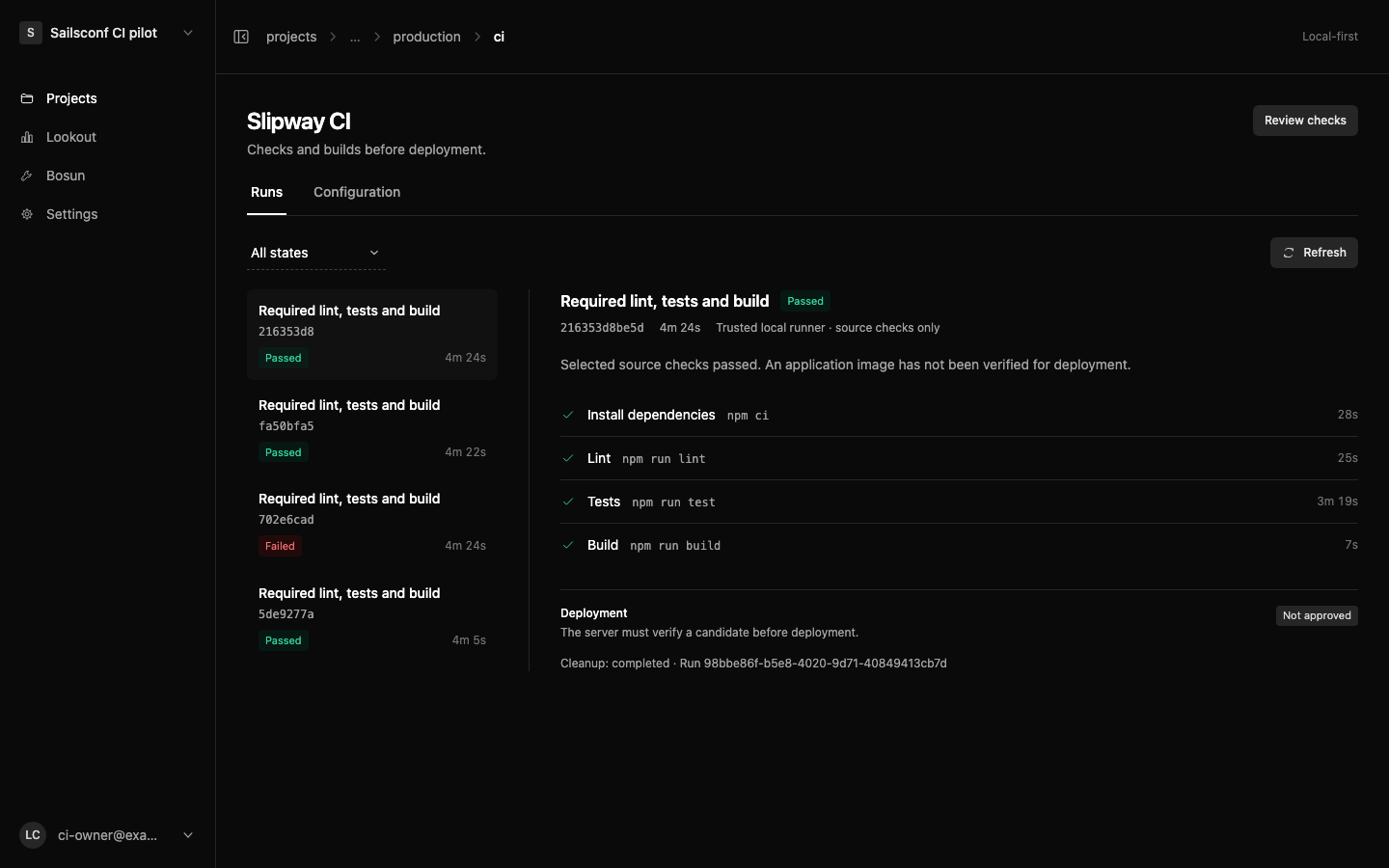
The historical local-pilot screenshot illustrates the separation between source checks and deployment verification.
Optionally trust your device
slipway ci:register --project my-app --env production --app web \
  --name 'My development machine' --trust-device \
  --approve-target my-app/production/web
Trust the device's administrator as well as the device. Its signature identifies an approved signer; it does not independently prove that an administrator executed the checks honestly. The CLI keeps credentials, signing keys and retained evidence outside the repository. Job code receives neither CLI credentials nor the signing key.
Optional local runs
Commit first: the runner uses a Git archive of that commit and excludes uncommitted changes. A local run still needs the enabled, reviewed app policy and approved device.
slipway ci --project my-app --env production --app web --local
# Push that exact commit to the configured branch, then submit the retained report.
slipway ci:submit --project my-app --env production --app web \
  --report <path-printed-by-ci>/report.json
slipway ci:status --project my-app --env production --app web
Without --local, slipway ci also attempts submission immediately. If the commit has not been pushed, retain the report and submit after pushing. A merge with a different SHA needs a new run. ci:status only reads retained results; it does not start checks.
Deployment verification
Slipway independently checks GitHub's current branch head, source tree, package/lockfile bytes, current policy and runner trust. A local receipt must contain a signed one-use challenge, ordered successful checks and cleanup, and be no more than an hour old. Client-supplied source hashes alone are not authority.
Local-only mode can wait up to twenty minutes for qualifying evidence. Automatic mode instead uses isolated server fallback. Policy, trust and candidate verification are checked again before traffic moves; changed policy, revoked devices, stale ownership or a mismatched image block promotion. Existing schema, health, routing and rollback safeguards remain in force.
Keep source-check evidence, candidate verification and merge/deployment decisions distinct. Source-check asset output is discarded; it is not silently promoted as the tested production image.
Browser tests
A stock Node image does not bundle Playwright's browser and all required Linux libraries. Review app-owned provisioning during installation, finish downloads before network disconnection, and point the test runner at the resulting workspace files. Validate the complete suite within the existing budgets; do not skip browser cases or widen privileges to make a run pass.
Browser fixtures also need their actual application assets. A page responding successfully does not establish that its JavaScript, styles or event handlers loaded. Keep test-asset preparation distinct from the required production build and inspect missing assets before weakening selectors or tests.
See dependency provisioning and coverage mapping for the migration checklist. A browser launch probe is compatibility evidence, not proof that the full application suite passed.
Troubleshooting
| Symptom | Inspect first |
|---|---|
| No standalone run for a feature branch or PR | This release dispatches server CI through deployment admission. Keep the existing PR-check workflow; do not deploy merely to test CI. |
| Chromium executable or shared library missing | The reviewed install lifecycle and app-selected browser/library paths. Downloads must finish before isolated checks. |
| Browser selectors time out on an otherwise loaded page | Built test assets, JavaScript/style responses and browser errors; preserve the original coverage. |
ENOSPC or resource failure | Workspace and temporary-mount bytes/inodes, cgroup memory and private logs, not only free host disk. See diagnostics. |
| Waiting for capacity or cleanup | Only one server CI job is admitted across the instance. Confirm memory headroom and owned-job cleanup; uncertain cleanup holds capacity for inspection. |
| A local result is not accepted | Exact pushed SHA, policy revision, approved device, complete results, one-use challenge and the one-hour freshness limit. |
| Source checks pass but deployment is blocked | The candidate's image/runtime/configuration and current policy/trust. A source receipt cannot bypass deployment verification. |
| A green Slipway run is absent from GitHub PR checks | Automatic GitHub status mirroring is not implemented in this release. A retained run is not a published PR check. |
Security boundaries
Jobs run non-root with a read-only root, bounded executable workspace, dropped capabilities and no production environment, host checkout or Docker socket. Installation has network access; subsequent checks run with external networking disconnected. Preserve those boundaries when adding dependencies or fixtures.
Policy changes, cancellation and lost deployment ownership stop server work. Uncertain cleanup holds capacity rather than pruning unrelated containers. Private raw logs and credentials do not belong in public evidence; retained server diagnostics are bounded and redacted.
Change or revoke access
Review a new policy after changing required commands, runtime, platform or executor. Approve devices for that revision again; old results cannot satisfy it.
slipway ci:revoke --project my-app --env production --app web \
  --runner <runner-uuid> --approve-target my-app/production/web
Use CI → Configuration to revoke devices or disable the policy. Disabling it while an admitted deployment is in flight invalidates that candidate's promotion; review the change and start a new deployment.
Resource budgets and migration
The earlier execution profile used CLI 0.0.4. Profile v4 changes the executor/configuration digests and requires matching server/CLI support, a reviewed policy and newly approved devices. Software updates do not silently migrate an existing policy.
Resource budgets and bounded download reuse explains the limits and measurement semantics. Migrating existing checks covers coverage mapping, compatibility and cutover criteria.
Adopt it gradually
Keep existing GitHub checks and branch protection while validating the app. This release does not provide standalone non-deploying PR execution or automatic GitHub status reporting, and it does not replace arbitrary GitHub Actions workflows. Preserve unrelated release/security workflows. A staged compatibility trial is not a completed CI cutover.
Compare identical commits and cold/warm conditions before claiming a performance improvement. Public guidance should describe implemented behavior, not an unfinished application trial or a proposed runner architecture.